
Sign up for Warehouse timeslot booking (TAS)
Sign up for your visit
Step 2
Click on +Add a Visit for warehouse… and select the correct location.

Step 3
Add the Visit Item ID (SSID) that you received.
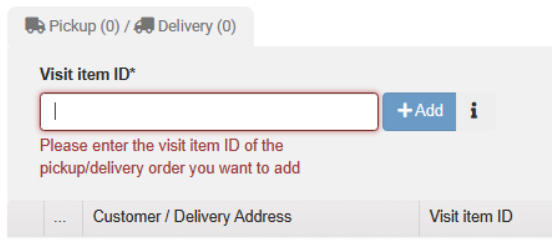
If you want to load multiple SSIDs into one truck, add them to step 1.

Step 4
Fill in company information
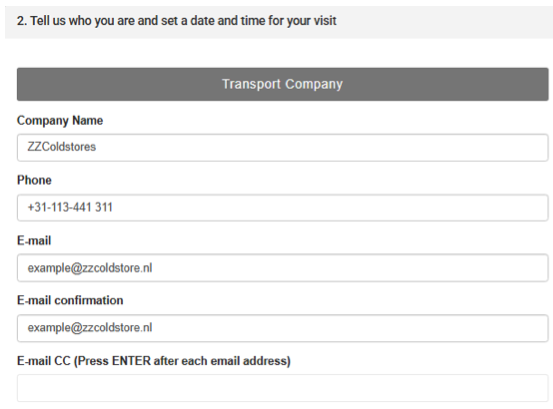
Step 5
Then enter the correct time slot
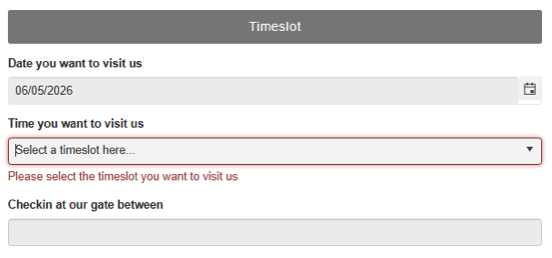
Step 6
Save all information

Step 7
After this, you will receive the Visit number with which your driver can register at the report desk in Kruiningen or Vlissingen.
Location Kruiningen: 51.47709217430428, 3.6996375203189285
Location Vlissingen: 51.47100343573556, 3.700508567667066
You are now finished
Make adjustments?
If you wish to modify an existing Visit number, this is possible; you can do this, for example, if your truck is delayed.Enter the existing Visit number and click 'Edit'.
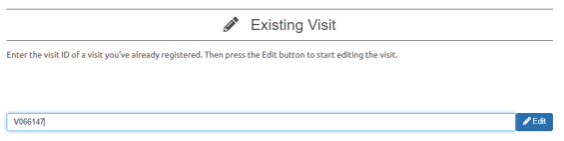
Here you can choose the new date + time:
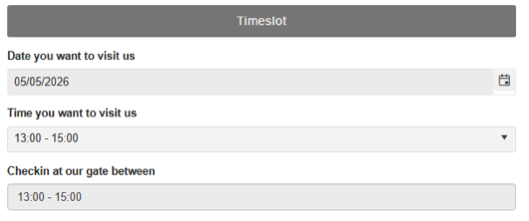
After the change, press 'Save' again
If you cannot find a suitable time slot or wish to change your Visit number to an earlier time, you can send an email to: export@zzcoldstore.nl (Kruiningen) or exportvlissingen@zzcoldstore.nl (Vlissingen).